How do I know if a SIP trunk has stopped completing calls?
The direct way is to call it. Monitor places a real test call to each voice circuit (SIP trunk, branch extension, or contact center number) at the agreed pace and checks three things: whether the call connected, whether audio flowed both ways, and whether the voice sounded clear. It is SIP call monitoring done from the outside, the way the customer lives it. When any of the three fails and the failure is confirmed, your team gets the alert with the SIP code as proof.
Conventional monitoring asks the equipment whether it is up. The PBX says yes, the trunk shows as registered, and the network is green, while callers hear silence. A real call does not depend on what the equipment says about itself. The technique is called synthetic monitoring, and the guide to synthetic call monitoring explains when to use it alongside passive monitoring, as the guide on passive monitoring vs active test calls compares in detail.
What does each test call check?
| Check | What counts as a failure |
|---|---|
| The call connects | A carrier rejection (for example SIP 403, 404, 480, or 503), or no response at all |
| The right thing answers | The expected greeting, test tone, or echo service does not answer |
| Audio both ways | One-way audio or no audio (a silent call) |
| Voice quality | Measured MOS-LQO below the agreed threshold: the call counts as degraded |
Each result carries the SIP code and the Q.850 cause. To read the most common ones, see SIP 503, SIP 486, SIP 480, SIP 408 and Q.850 causes 16, 34 and 127. If the call connects and then goes silent, the guide to silent calls and one-way audio shows the causes. For the time to the first ring, see post dial delay, and for the share of calls answered, ASR and ACD.
How does Monitor avoid false alarms?
A failed call is retried at your pace, a retest before alerting. Only consecutive failures, four by default (the first plus three retries), open an incident. A one-minute blip does not wake anyone up in the middle of the night, and an alert at 2 a.m. is always real.
If the problem is on 2N5’s side, for example our calling platform not responding, the test is marked blind: it does not count against the trunk, does not go into the SLA, and does not notify the customer. Maintenance windows silence alerts while the carrier or your team works on the circuit.
What evidence goes to the carrier?
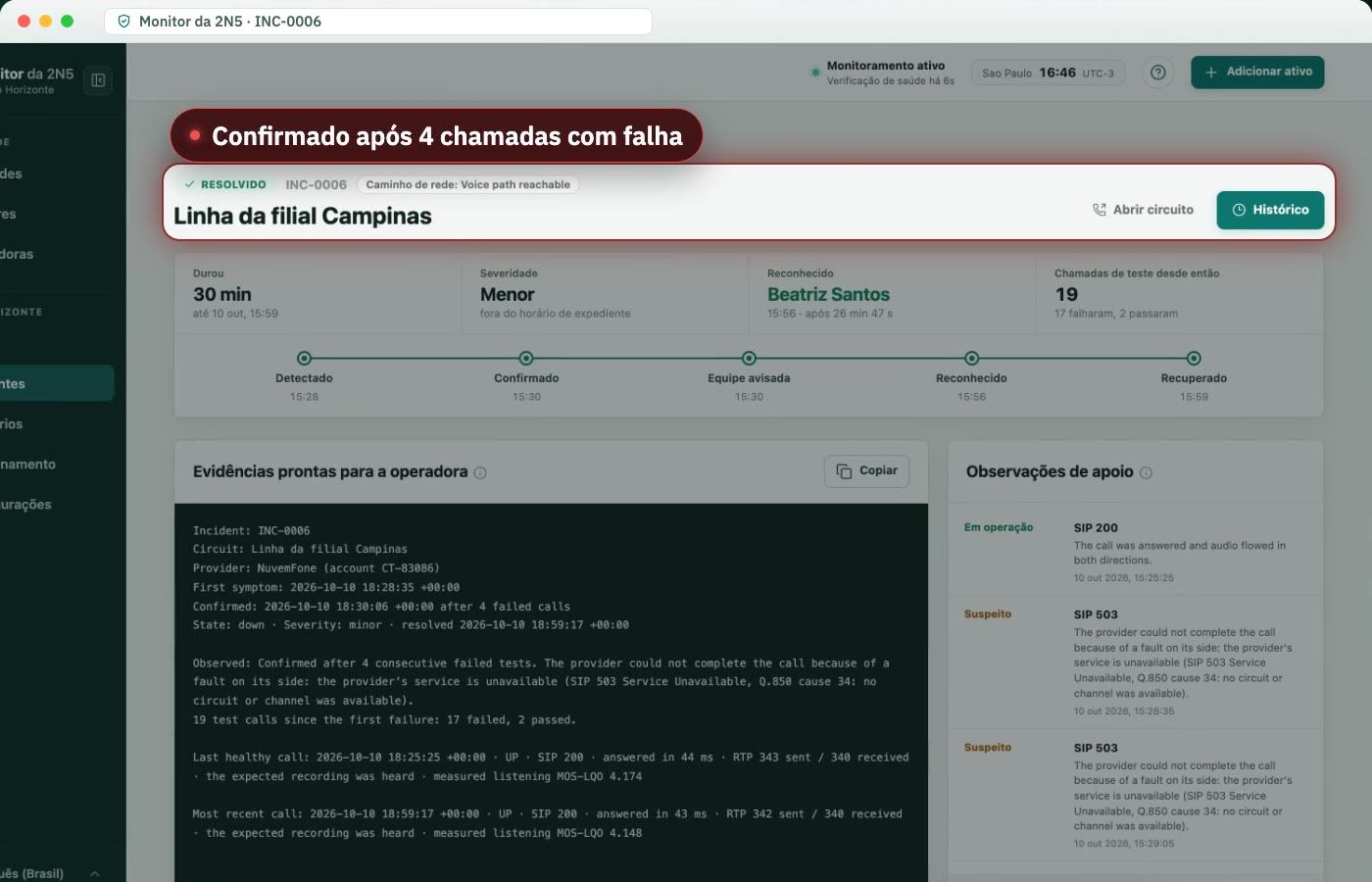
Each incident includes a block ready to paste into the ticket: the circuit, the carrier, the first symptom, the SIP code and Q.850 cause of every call, and the last healthy call. It is the answer to “no fault found”: the time, the number called, and what the route returned.
Sample evidence, with demo data: SIP 503 Service Unavailable, Q.850 cause 34 (no circuit/channel available), confirmed after 4 failed calls.
Who gets notified, and how?
Your company’s escalation ladder, by email, one tier at a time, until someone acknowledges the incident with a tap on their phone. See alerts and escalation.
How does Monitor compare with network and capture tools?
Network and capture tools answer different questions: what the equipment reports and what passed through the network. Monitor answers whether a real call connects. See the comparisons with VoIPmonitor, Zabbix and PRTG, and the voice circuit monitoring guide.
Frequently asked questions
How do I monitor a SIP trunk 24/7?
With real test calls at a fixed interval, day and night, not just the registration status. Monitor by 2N5 calls a number answered by that trunk, checks whether the call connected, whether audio flowed both ways and whether the voice sounded clear, retries a failed call, and only then alerts your team, with the SIP code and the Q.850 cause.
Passive vs active VoIP monitoring: which do I need?
Passive monitoring analyzes the calls customers have already made, through packet capture or call records; it shows what happened, but sees nothing when nobody calls. Active test calls dial on a schedule and find the failure before the customer does, overnight included. If you need to know first, you need active, and the two complement each other.
What is synthetic call monitoring?
Synthetic monitoring, or synthetic call monitoring, is testing in which a system places real calls to your number on a schedule and records the result of each one: whether it connected, what answered, whether there was audio, and how the quality was. It is what Monitor by 2N5 does on every voice circuit, as opposed to passive monitoring.
What do SIP errors 503, 486, 480 and 408 and Q.850 causes 16, 34 and 127 mean?
SIP 503 says the server cannot handle the call right now, because of overload, maintenance or no free channel. 486 is busy, 480 is destination temporarily unavailable, and 408 is a timeout with no answer. In Q.850, cause 16 is normal clearing, 34 is no circuit or channel available, and 127 is an unspecified interworking failure. Monitor keeps both codes for every failure.
Does Monitor need access to my PBX or my SBC?
No. 2N5 places the test calls from its own platform, to the numbers you specify, just as anyone would. Nothing is installed on your PBX, your SBC, or your voice network, and the monitoring does not depend on what the equipment reports about itself. That is why it works with any PBX or contact center platform, with no integration.
How often is each trunk tested?
At the pace agreed with you, for example every 15 minutes, or at fixed times, including overnight and on weekends. A failed call is retried before any alert, and only four consecutive failed calls, the first plus three retries, open an incident. So a one-minute blip wakes nobody, and an alert in the middle of the night is always real.
Do the test calls take up channels on my trunk?
Each test is a short call to a number you choose, within an agreed call limit. It holds one channel on the trunk for a few seconds, like a customer call, and never touches your customers' calls. The test pace is agreed with you precisely so that the tests do not compete with your customer service for channels.
Does it work with any carrier?
Yes. The test dials the number, so it works with SIP and E1 trunks from any carrier and with any PBX, with no integration. The result of every call includes the SIP code and the Q.850 cause the route returned, which is exactly what the carrier needs to open or close a ticket.
What happens when the fault is on 2N5's side?
The test is marked as blind, never as a failure of your trunk. It does not count against your SLA, does not open an incident for you and does not wake anyone on your team; 2N5 is the one notified, if it lasts more than 30 minutes. A fault in the monitoring itself is never charged to your circuit.